
Download DayCalc – Free Countdown Timer for Days, Weekdays & Weekends
Overview
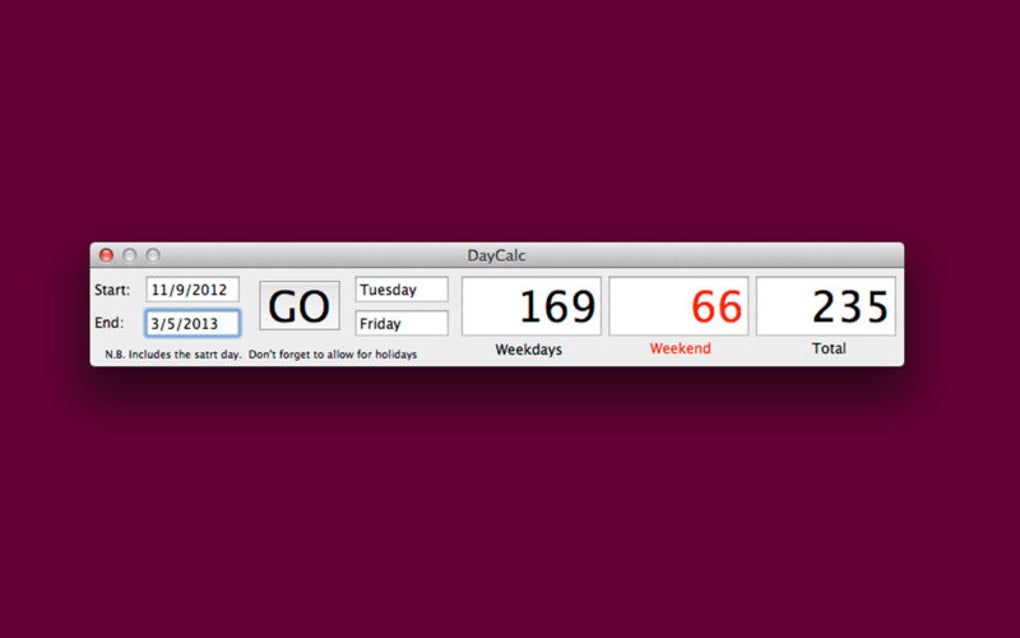
DayCalc is a lightweight, completely free countdown timer that focuses on the most practical unit for long‑term planning – days. Unlike traditional timers that merely count hours or minutes, DayCalc lets you set a start date and an end date, then instantly shows how many total days, weekdays, and weekend days remain. This makes it ideal for project managers tracking deadlines, teachers planning school terms, event organizers counting down to a conference, or anyone who simply wants to know how much “real” time is left before a key date.
The interface is deliberately minimalistic: a clean calendar picker, a single “Start” button, and an easy‑to‑read result panel. No ads, no hidden fees, and no unnecessary frills. DayCalc runs in a web browser, which means it works on Windows, macOS, Linux, Android, and iOS without the need for a separate installation package.
Because it’s web‑based, updates are instant and the tool remains secure – you always get the latest version when you load the page. Whether you need a quick reference for a vacation, a countdown to a product launch, or a precise calculation of workdays left for a contract, DayCalc delivers accurate results with just a few clicks.
Key Features & Benefits
What DayCalc Offers
- Simple date range selection using an intuitive calendar widget.
- Instant calculation of total days, weekdays (Monday‑Friday), and weekend days (Saturday‑Sunday).
- Automatic handling of leap years and public holidays (optional manual entry).
- Responsive design – works flawlessly on desktop browsers and mobile devices.
- Zero‑cost, ad‑free experience with no registration required.
- Secure HTTPS connection ensuring your date data is never stored on a server.
- Real‑time updates – any change to the start or end date refreshes the results instantly.
- Export options: copy results to clipboard or download as a plain‑text file.
Why Users Love DayCalc
DayCalc’s biggest advantage is its focus on the user’s real‑world needs. By separating weekdays from weekend days, it helps professionals estimate labor costs, allocate resources, or plan sprint cycles more accurately. Students can calculate study days left before exams, while families can see how many school days remain before holidays.
The tool’s minimalist design eliminates distractions, allowing users to get the information they need within seconds. Because it runs entirely in the browser, there’s no software to install, no updates to manage, and no compatibility worries – you simply open the site, enter your dates, and receive a clear, color‑coded breakdown. The free nature of DayCalc also means you can share the link with teammates or collaborators without worrying about licensing.
In short, DayCalc turns a common scheduling problem into a quick, transparent, and reliable calculation.
Installation, Usage & Compatibility
How to Get Started
Since DayCalc is a web‑based application, there is no traditional “installation” process. Follow these steps to start counting down:
- Open your preferred web browser (Chrome, Firefox, Edge, Safari, or any modern browser).
- Navigate to the official DayCalc URL: https://daycalc.example.com.
- The homepage loads a clean interface with two calendar fields – “Start Date” and “End Date”.
- Click each field to bring up the date picker, then select your desired dates.
- Press the “Calculate” button. Within milliseconds, the result panel displays total days, weekdays, and weekend days.
- If you need to adjust the range, simply change either date and the calculation updates automatically.
- To share your results, click the “Copy” button to place the text on your clipboard, or click “Download” to save a .txt file.
Device & Operating System Support
DayCalc works on all major operating systems that support modern browsers, including Windows 10/11, macOS Ventura and later, Linux distributions, Android 8.0+, and iOS 13+. Because the tool is built with responsive HTML5, CSS3, and JavaScript, the layout adapts to different screen sizes, ensuring a seamless experience whether you’re on a 27‑inch monitor or a 5‑inch smartphone.
Security & Updates
DayCalc is hosted over HTTPS, meaning all data you enter is encrypted during transmission. No personal data is stored on the server; the calculation occurs locally in your browser’s memory and is discarded when you close the tab. Updates to the application are deployed automatically by the development team, so you always benefit from the latest bug fixes and feature enhancements without any manual effort.
Pros and Cons
Advantages
- Completely free and ad‑free.
- Accurate separation of weekdays and weekend days.
- No installation required – runs in any modern browser.
- Responsive design works on desktop and mobile.
- Secure HTTPS connection; no data retention.
- Instant real‑time updates as dates are changed.
Drawbacks
- Lacks advanced project‑management features such as task lists or Gantt charts.
- No built‑in holiday calendar (requires manual entry).
- Dependent on internet access for the initial page load.
- Limited customization of the UI (color themes, fonts).
Frequently Asked Questions
Is DayCalc completely free to use?
Yes, DayCalc is 100% free. There are no hidden fees, subscriptions, or advertisements. All features are available to every user.
Can I use DayCalc offline?
DayCalc requires an initial internet connection to load the web page. Once loaded, the calculation itself runs locally in your browser, so you can keep the tab open and continue using it without a constant connection.
Does DayCalc support different time zones?
The tool uses your device’s local time zone. If you need to calculate dates across time zones, simply adjust the start or end date accordingly before running the calculation.
How does DayCalc handle leap years?
Leap years are automatically accounted for. When you select February 29 in a leap year, DayCalc includes that extra day in the total count, ensuring precise results.
Can I export the countdown results?
Yes. After the calculation, you can click the “Copy” button to place the results on your clipboard or use the “Download” button to save a plain‑text file with the breakdown of days, weekdays, and weekend days.
Conclusion & Call to Action
DayCalc fills a niche that many generic countdown tools overlook – the clear distinction between workdays and weekend days. Its simplicity, speed, and cross‑platform availability make it a go‑to resource for anyone who needs to measure time in a practical, business‑oriented way. While it doesn’t replace full‑featured project‑management suites, it excels as a lightweight companion for quick date calculations, planning, and communication. Because it’s free, secure, and instantly accessible from any browser, there’s no reason not to add DayCalc to your daily workflow. Ready to see exactly how many weekdays you have left until your next deadline? Visit DayCalc now, set your dates, and start counting down – absolutely free.







